
Memos-Compatible Capture
You need a connected interface and a supported Memos client.
This is a write-in capture endpoint, not an importer for an existing Memos server. It implements a bounded Memos 0.29.1 API subset; the previously accepted client is MoeMemos Android 2.0.4.
- Prepare the Extension: use Browse Registry to select
inkcre/memosversion0.3.0for Core Host SDK0.3.x, then confirm the installation back in the Web app. For an existing installation, follow that guide's version-change instructions. - In Extensions, choose Enable… on Memos, select This browser, confirm, and open Setup. The same release supplies the browser setup and Core service; do not install a different version for each client.
- Choose your Core if more than one is available, then select Prepare connection. Setup generates or reuses a dedicated PAT and enables Memos on that Core when necessary.
- Copy Server URL and Personal Access Token into the supported Memos client's account setup. Use the complete URL shown, not PostgREST, and do not append
/api/v1. - Write a distinctive note, refresh the client, and reopen it. Then index and search for the same text in InKCre.
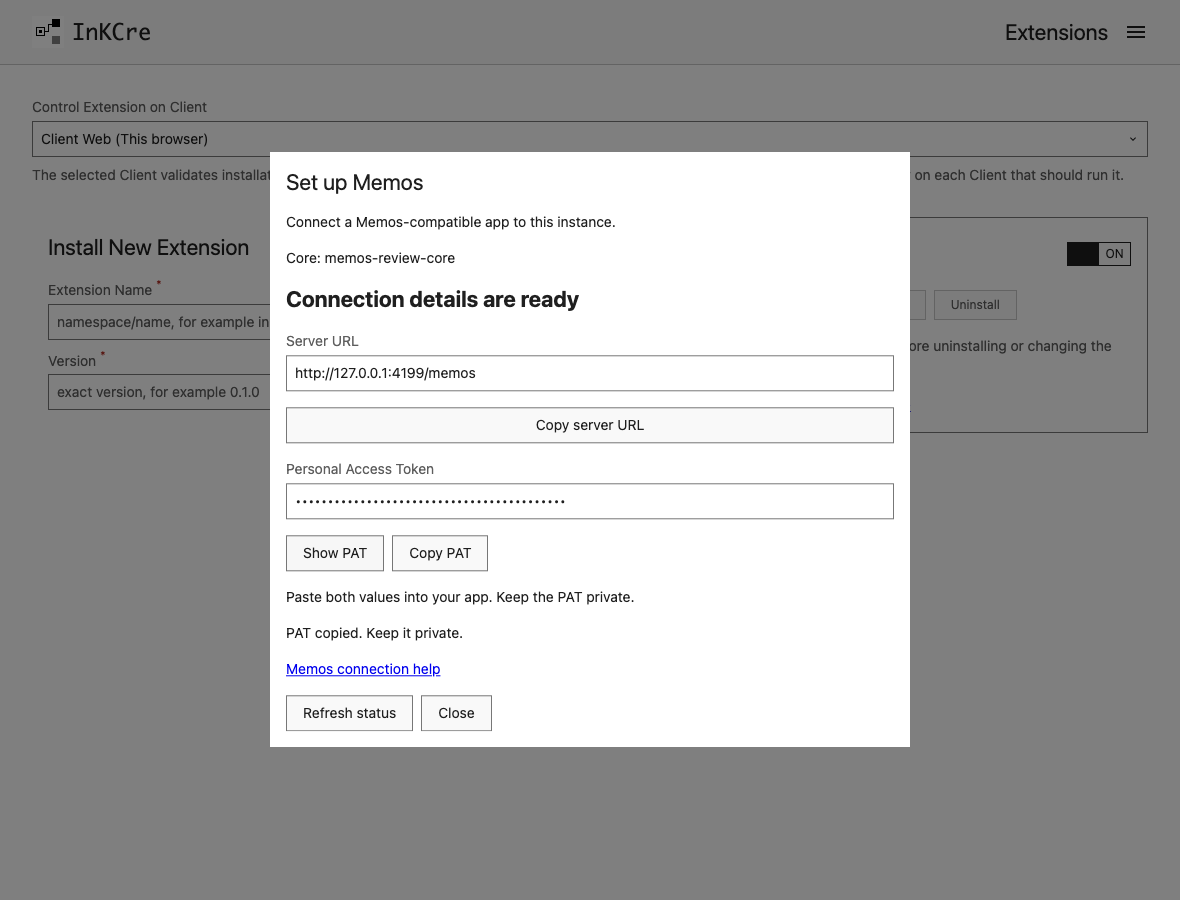
Copy both values from Setup; keep the PAT masked and private.
If setup reports a missing public address, set your Core's Public HTTP Base URL in Peers → Edit Config, then refresh setup. The address must be reachable from your Memos client. The Memos connection help link opens the installed version's step-by-step guide; the Extension card also links its available global, Core, and Web documentation.
There is no Source to create or collection schedule: the client writes notes directly. Index maintenance remains separate. Other client versions may use unsupported endpoints.
To disconnect, remove the account from the client and rotate or clear the Extension's token. Disabling the Core Extension withdraws its routes; neither action erases saved notes.
This is a capture endpoint for notes you write, not an importer for an existing Memos server. It implements a bounded Memos 0.29.1 API subset; the previously accepted client is MoeMemos Android 2.0.4. Other clients or versions may use unsupported endpoints.
1. Configure the Extension
Start with a connected CLI and a Core HTTPS URL. Install the Core Host SDK 0.3.x release, or inspect inkcre-cli extension get inkcre/memos if already installed:
inkcre-cli extension install inkcre/memos --version 0.3.0Generate a dedicated PAT and save it in your password manager. Its required format is memos_pat_ followed by exactly 32 ASCII letters or digits. For example, run locally:
python -c 'import secrets, string; print("memos_pat_" + "".join(secrets.choice(string.ascii_letters + string.digits) for _ in range(32)))'In a private folder, save memos.json, replacing the placeholder with that PAT:
{
  "personal_access_token": "YOUR-GENERATED-MEMOS-PAT"
}inkcre-cli extension config update inkcre/memos --input memos.json
inkcre-cli extension enable inkcre/memosThe update response can contain the PAT; keep both it and the file private. This token authorizes the Memos interface, not general Core administration. Never substitute JWT_SECRET.
2. Connect the client and write a note
- In the supported client's server/account setup, use
https://YOUR-CORE-HOST/memosas the server address and the PAT as its access token. Do not use your PostgREST URL or append/api/v1. - Write a short note with distinctive text, such as “Memos capture verification orchid”.
- Refresh the client's list and reopen the note to confirm it was saved.
- Maintain the index and search for the same text from InKCre.
There is no source create or collection Cron for this path: saving in the client sends the note directly to InKCre. Schedule index maintenance if you want new notes searchable without a manual run. The supported subset includes notes, attachments, and comments, not full Memos administration, social features, or browsing the entire InKCre info-base.
Disconnect or troubleshoot
If login fails, verify the /memos server prefix, PAT format, and running Core Extension. An unsupported client endpoint can fail even with valid credentials; use the pinned client/API pairing before diagnosing the instance itself.
Remove the account from the client and rotate or clear personal_access_token to revoke the old credential. Disable the Extension to withdraw its routes. These actions do not erase stored notes.
See the release listing and the Memos runtime contract.